
Is Windows holding your PC back?
If you are a gamer or a power user, you’ve probably heard of Windows optimization playbooks like AtlasOS and ReviOS. Both projects promise to strip down Windows bloatware, disable heavy telemetry, and unlock maximum FPS with minimal system latency.
But as a cybersecurity enthusiast, a major red flag immediately pops up: Are these modified configurations actually safe to use, or do they expose your system to critical vulnerabilities? In this deep dive, we will break down the security and privacy trade-offs of AtlasOS vs ReviOS so you can make an informed, secure decision.

What are Windows Optimization Playbooks?
Unlike older, sketchy custom ISOs (like Ghost Spectre) that require downloading an entire pre-baked operating system from untrusted third-party forums, AtlasOS and ReviOS use a much safer approach: Playbooks.
A playbook is an automation script. You install a standard, official, and 100% clean version of Windows directly from Microsoft. Then, you run an open-source tool (like the AME Wizard) that applies the playbook to modify your existing system. This means you aren’t installing a cracked OS you are just automating the removal of Windows features.
Performance Boost vs. Security Risks: The Trade-Off
To achieve higher FPS and lower latency, these playbooks have to cut deep into the Windows core. From a performance standpoint, it works. But from a cybersecurity perspective, it removes critical layers of defense.
1. The Windows Defender Dilemma
AtlasOS: In its earlier versions, AtlasOS completely removed Windows Defender to save CPU cycles. Today, they give you the option to keep it, but many optimization scripts still disable heavy background mitigation features.
ReviOS: Uses its own tool (Revision Tool) to let users toggle Windows Defender on or off.
🔥 The Security Verdict: Disabling your primary antivirus on a machine connected to the internet is a massive risk. If you use these playbooks, keeping Defender active is mandatory.
2. Windows Updates and Zero-Day Patches
Both playbooks heavily modify or delay Windows Updates because updates often reinstall the bloatware and telemetry that the playbook just removed.
By delaying or stripping the update components, your system misses out on critical Zero-Day security patches.
If a new threat emerges, an unpatched Windows machine is a sitting duck for exploits.
Privacy Check: Open-Source Code Analysis
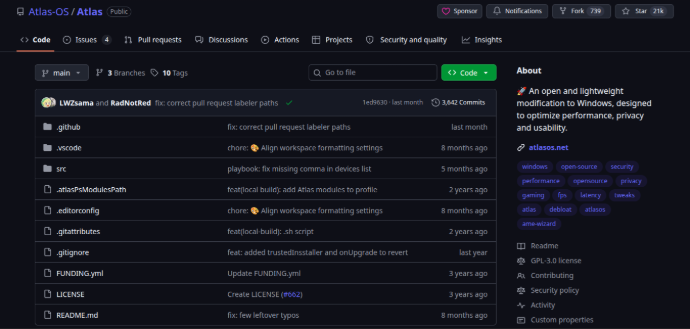
One of the best ways to verify if a tool contains malware or a backdoor is to look at its source code.
AtlasOS is entirely open-source on GitHub. Anyone can inspect every single line of script it executes. This transparency makes it highly trusted within the tech community because backdoors cannot be easily hidden.
ReviOS is also highly transparent and utilizes well-known open-source scripts, but some of their custom implementation tools are pre-compiled, meaning you rely slightly more on trust.
AtlasOS vs ReviOS: Which One Should You Choose?
| Feature | AtlasOS | ReviOS |
| Delivery Method | Playbook (via AME Wizard) | Playbook (via AME Wizard) |
| Source Code | Fully Open-Source | Mostly Open-Source |
| Default Defender | Optional / Removable | Optional / Managed via Revision Tool |
| Target Audience | Hardcore Gamers | Gamers & Daily Power Users |
If your primary focus is maximum transparency and tweaking control, AtlasOS is the superior playbook due to its completely open GitHub infrastructure.
If you want a slightly more balanced approach that keeps daily stability in mind while still stripping out Microsoft's telemetry, ReviOS offers an excellent, clean experience.
The Final Cybersecurity Verdict
Are they safe? Yes, they are free of malware, but they inherit structural security risks.
Because they disable default security mitigations and alter Windows Updates to maximize gaming performance, they inherently make your PC more vulnerable to advanced network exploits.
Our Recommendation: Never install these playbooks on your primary machine used for banking, crypto wallets, or sensitive work. However, if you have a dedicated, secondary gaming rig where you only launch trusted platforms like Steam or Epic Games, running AtlasOS or ReviOS with Windows Defender turned ON is a calculated risk that will absolutely give you a performance edge.
Looking for more safe ways to optimize your rig without compromising security? Check out Stop Gaming Lag: Ultimate Performance Boost Guide for PC & Mobile.
❓ Frequently Asked Questions (FAQ)
Q1: Is AtlasOS or ReviOS safe for online banking and personal use?
Answer: Strictly speaking, No. Because both playbooks disable structural Windows security mitigations and delay critical security patches to prioritize gaming performance, we do not recommend using them on a primary machine containing crypto wallets, banking apps, or sensitive personal data.
Q2: Do AtlasOS and ReviOS contain malware or spyware?
Answer: No, they are clean. AtlasOS is completely open-source on GitHub, meaning its code is fully transparent and inspected by the global cybersecurity community. ReviOS also uses verified, transparent optimization scripts, so neither project contains hidden Trojans or backdoors.
Q3: Can I play games with anti-cheat software (like Valorant's Vanguard or Faceit) on these systems?
Answer: Yes, but with tweaks. Both playbooks support major anti-cheat engines, but since they heavily modify Windows core components, you may need to manually re-enable certain security features (like Secure Boot or TPM) inside their configuration tools for games like Valorant to launch properly.